
← All articles
MegaTGAI · Practical guide
Create Telegram bots automatically
Bots support inviting: they help prepare groups and manage administrator permissions. MegaTGAI creates them through BotFather, saving you from repeating the same steps manually.
Click a screenshot to enlarge it.
01
Choose the quantity and start
Open Inviting → Bot farming. The application uses accounts and proxies from the main pool.
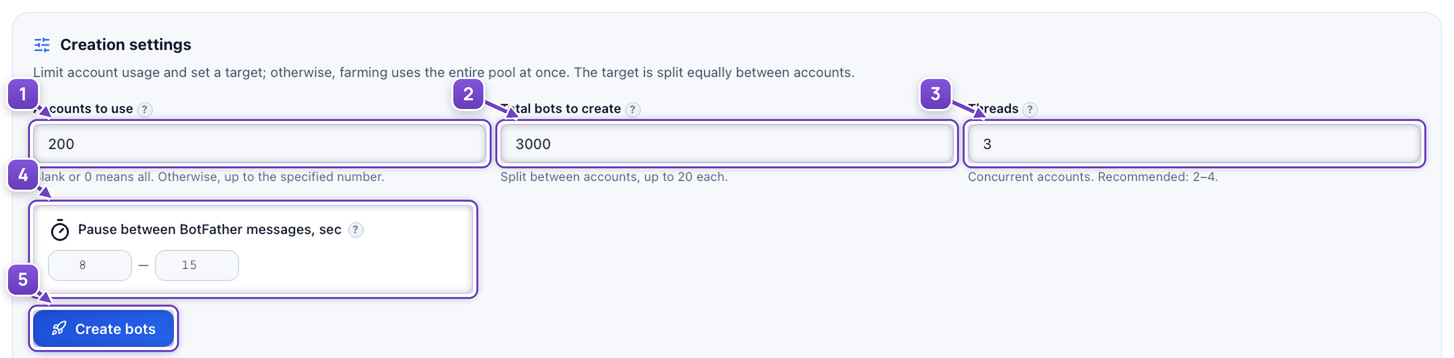
- Choose how many accounts to use.
- Set the total number of bots to create.
- Choose the number of concurrent accounts.
- Keep or adjust the delay between creations.
- Click Create bots.
BotFather limits are shown in the same section. More concurrent accounts do not remove Telegram limits.
02
Your bots, all in one place

- See how many bots are available and how long they have been held.
- Select the bots you need and copy their tokens. With no selection, all tokens are copied.
03
Use them to prepare groups
Use the bots when setting up inviting instead of creating a new one by hand each time. Prepare a reserve for several groups in advance.
Screenshots illustrate settings and accumulated results. Access tokens are not shown.