
MegaTGAI · How it works
Telegram invitations with an admin bot and automatic group setup
The bot automates permissions and helps prepare the group. Worker accounts add people, while you avoid manually appointing administrators whenever accounts are replaced.
Click a screenshot to enlarge it.
How the chain works
Bot → main administrator → worker accounts. The bot grants permissions to the main administrator, who appoints the worker accounts that invite people. A regular invitation is attempted first. In the admin flow, a person temporarily receives permissions, which are then removed; after successful completion, they remain an ordinary group member.
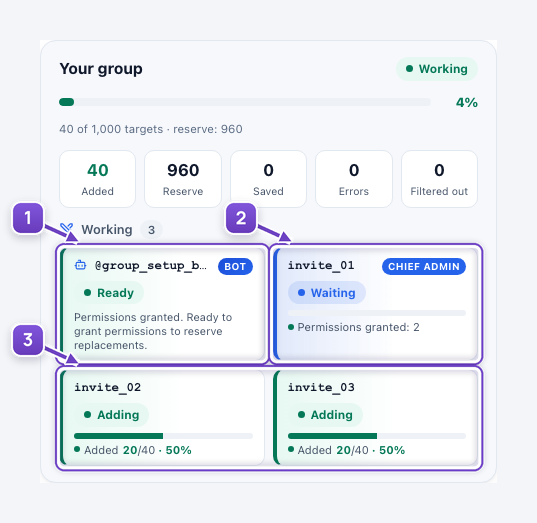
- The management bot grants permissions to the main administrator and their replacement.
- The main administrator appoints worker accounts.
- Worker accounts add people. Their status and results are visible here too.
Why the bot matters when accounts are replaced
If the main administrator becomes unavailable and needs replacing, the program selects an available account and the bot appoints the new main administrator. Worker accounts that become unavailable or reach their limit are replaced through the main administrator. You do not need to reopen Telegram and reassign permissions manually each time.
How the group is prepared automatically
If an appearance reference is configured, the program uses the bot to prepare the group’s name, description, avatar, posts and pinned messages. Member and working-role permissions follow your settings. An account also invites the selected cleanup bot, and the management bot grants it permission to delete messages so it can remove join and leave notices.
- Go to the invitation setup guide
Your own or a farmed group: bot, accounts, audience and the plan on the group card.
- More about appearance and posts
Appearance references, content preparation and publication schedules.
The screenshot uses the real MegaTGAI interface with staged accounts and counters. No real invitations were sent.