
MegaTGAI · Practical guide
Outreach to your existing Telegram conversations
Past work leaves conversations on your accounts. Use them for a new offer: AI selects suitable contacts from their history and continues the existing conversation. No new audience upload is needed.
Click a screenshot to enlarge it.
Enable re-engagement and define whom to contact
Enable Conversation re-engagement in the funnel’s first stage. Enter a criterion and choose an AI preset: the program evaluates both sides of the previous conversation. The source is the connected accounts’ existing private chats.
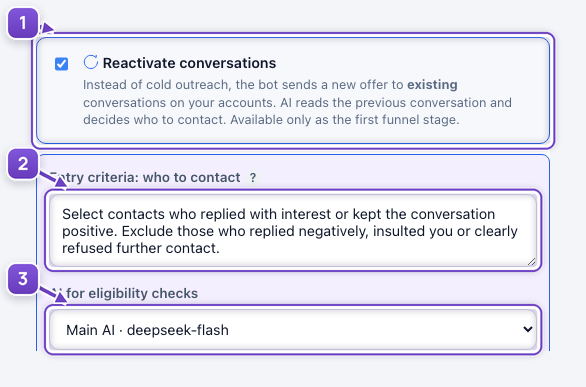
- Re-engagement on the first funnel stage.
- Interest and a positive tone qualify; negativity and insults do not.
- AI preset for evaluating the history.
Select contacts who replied with interest or kept the conversation positive. Exclude those who replied negatively, insulted you or clearly refused further contact.
Describe the new offer and start
Choose the AI task message type and describe your new offer. Save the stage and start messaging from Overview. AI connects the offer to the previous conversation, then your configured funnel continues.
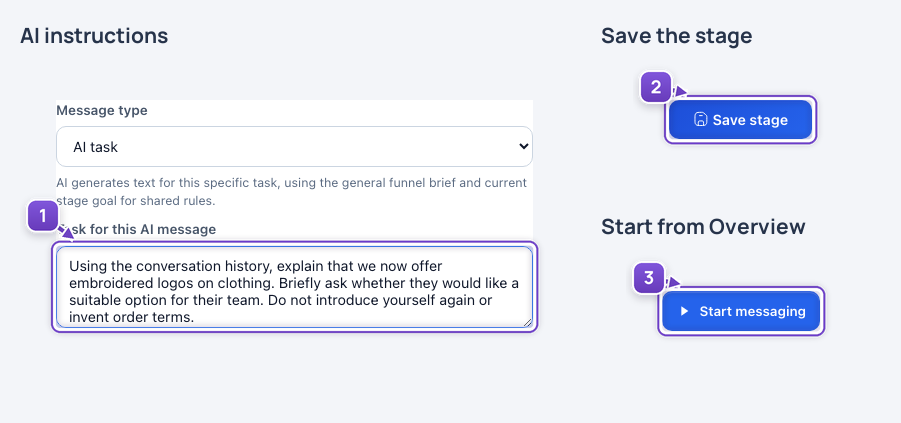
- The new offer in the AI instructions.
- Save the stage.
- Start outreach to existing conversations.
Using the conversation history, explain that we now offer embroidered logos on clothing. Briefly ask whether they would like a suitable option for their team. Do not introduce yourself again or invent order terms.
First activation clears the program’s targets, stored conversations and queue after confirmation. Funnel stages remain. The source is still the Telegram accounts’ own private conversation history.
The offer and settings are staged examples. No real conversations were used, messages sent or user data cleared.